

PacketDesk Logo

Monitor your network. Identify problems. Troubleshoot faster.

PacketDesk is a Windows network diagnostic utility for monitoring connectivity, latency, route behavior, and packet loss. Enter a hostname or IP address, start a test, and PacketDesk will run a traceroute, monitor the destination, and track each route hop over time.

Free & no account required Local processing, zero data collection Real-time monitoring & historical tracking

Capabilities

Everything you need to diagnose and troubleshoot network issues

Ping Monitoring

Continuously monitor latency to any hostname or IP address. Track response times, jitter, and packet loss over hours or days to identify patterns and intermittent issues.

Real-time Continuous Configurable
Traceroute & Route Monitoring

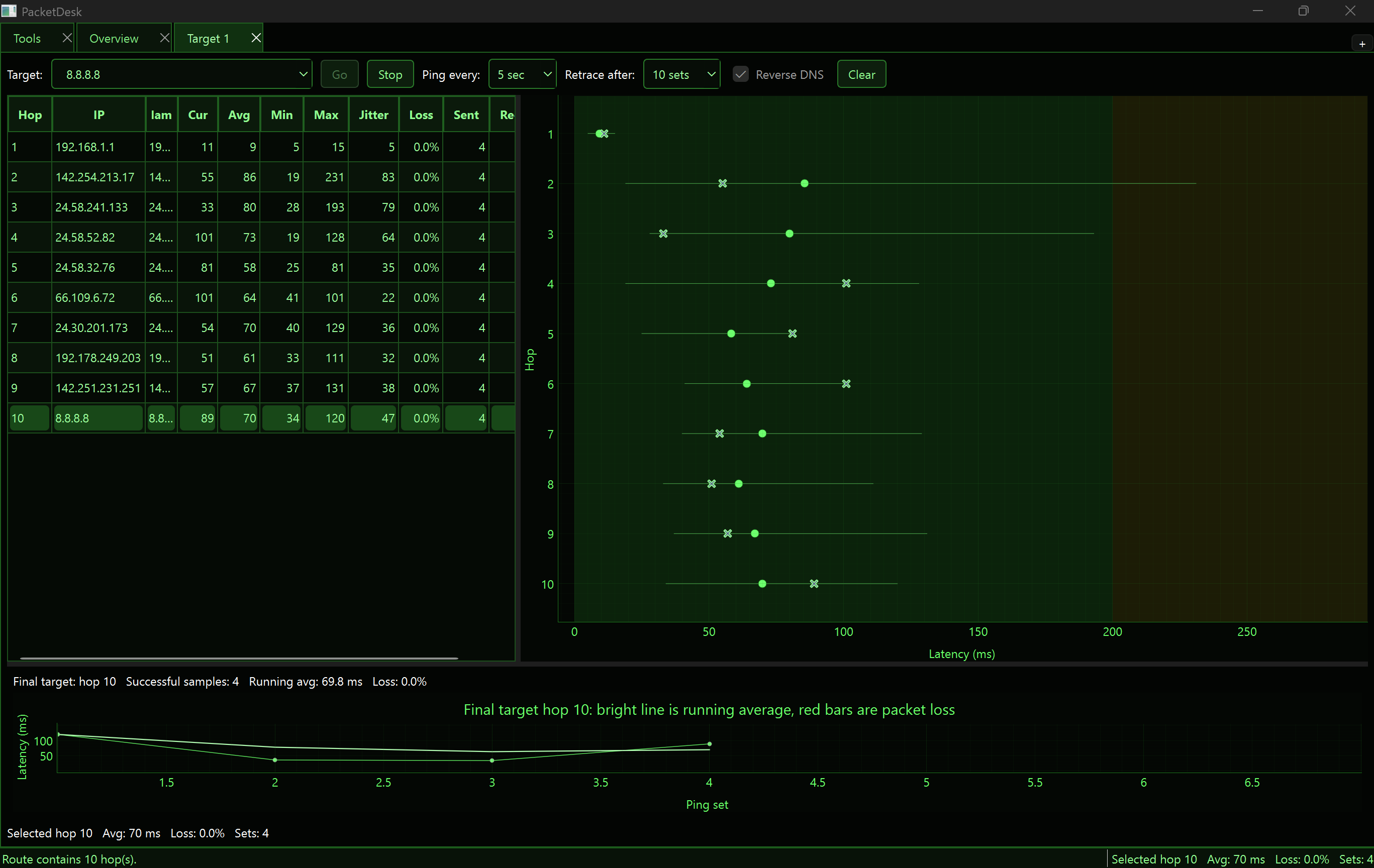
Run an initial traceroute, then track each hop along the route over time. Monitor individual routers and network segments to identify which link is causing problems.

Per-hop tracking Historical Configurable refresh

Clear Charts & Tables

Results displayed in easy-to-read tables and visual charts. Quickly spot latency spikes, packet loss, unstable hops, and changing network conditions at a glance.

Charts Tables Visual analysis

Comprehensive Diagnostics

Monitor latency with minimum, maximum, and average response times. Track jitter and packet loss. Adjust ping interval and traceroute refresh frequency to suit your needs.

Min/max/avg latency Jitter Packet loss

Privacy & Security

PacketDesk processes all diagnostics locally on your device. Network tests run only against destinations you choose. No data collection, storage, or sharing—ever.

Local processing No account Zero telemetry

Use Cases

PacketDesk is useful for troubleshooting a wide range of network issues

Home Networks

Diagnose WiFi and broadband issues. Track latency during gaming, streaming, or video calls to find what's causing slowdowns.

Business Networks

Monitor internal and external connectivity. Troubleshoot inter-office latency. Track VPN performance and identify unstable routes.

VPN Connections

Monitor VPN tunnel performance. Identify whether latency or packet loss is occurring on your local network, the VPN, or the destination.

Remote Services

Track real-world performance to cloud services, remote servers, and SaaS applications. Correlate performance with user experience reports.

Internet Connectivity

Diagnose ISP performance issues. Monitor your external internet connection and track uptime and quality over time.

Intermittent Issues

Capture historical data showing when and how network conditions change. Build a timeline of problems to share with ISPs or infrastructure teams.

In Action

See PacketDesk's clean interface and real-time monitoring capabilities

PacketDesk interface showing network monitoring dashboard

Ready to diagnose your network?

Download PacketDesk for free today. No installation required, no account setup, and your diagnostics stay on your device.

Download for Windows Get from Microsoft Store Back to products

Privacy statement: PacketDesk does not collect, store, sell, or share personal data. Network diagnostics are performed locally on your device and only against destinations you choose to test.